Nick Didlick

  • Welcome
  • AboutMe
  • Photography
  • Videography
  • 360World
  • Cinemagraphs
  • GetInTouch

Photos as Email attachments

by nickdidlick / Saturday, 02 April 2011 / Published in PhotoBlog

A recent seminar attendee asked about the file sizes coming from modern digital cameras and sending them as email attachments to family and friends.
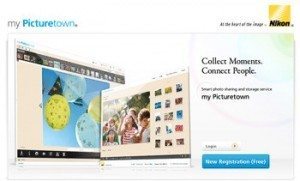
 

Nikon's My Picturetown

Question:

My e-mail internet service provider is Comcast. And Comcast has limitations on the size of an attachment to no more than 10MBs. Do you have a similar issue with your service provider? Comcast is telling me that this is a typical limitation of most internet service providers.

My concern is that if I ever upgrade my camera to the Nikon D7000, how am I going to e-mail image files made by the Nikon D7000.   The D 7000 is a 16.2 Megapixel camera!   I would think that a 16.2.megapixel file will be more than 10 MBs??   [Note: The files I now create with the D 80 which is a 10 Megapixel camera are about 8 MBs in size.].

This issue is before me now as I plan to soon upgrade my system. I was thinking about getting the D 7000 and a new 85 mm micro lens and have the D 7000 fitted with the Nikon 85 mm micro lens and my D 80 fitted with my existing Nikon 18-200 mm telephoto or vice versa.

I am sure that this issue has had to come up with other people.  The new camera technology is getting compromised by e-mail service provider limitations on file attachment size to less than 10 MBs. Has Nikon addressed this?
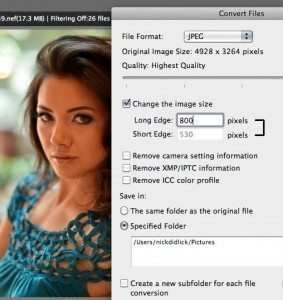
The Convert Files dialog box in Nikon View NX

Answer:

Comcast is right and a normal ISP (Internet Service Provider) attachment size is 2 megs and so you are lucky to have ComCast and the tec support people. Also some ISP’s will reject file sizes over 2 megs so for instance when sending to “[email protected]” your 10 megs attachment will bounce back at you.

So its not a Nikon or email issue generally, as most people sending files over 10 megs will not use email but an ftp site (File Transfer Protocol) a internet site that users can download really large file of 1-2 gigs or more), or a file sharing service like Nikon’s My Picture Town or a cloud storage service like Dropbox.
This isn’t a new problem new it has been like this for over 10 years, and before that the file sizes for attachments were generally smaller.

Solutions:

Option A – If I want to share a full resolution and want to make it simple for myself and the person wanting the full resolution image just download and use My Picture Town.
Option B – In most photo browser software I can change the original file size from something huge to something smaller for email or web use. I will use my favourite browser commercial Photo Mechanic or a free browser like Nikon View NX to do that for me. If you are using Nikon View NX look to the “Convert Files” button for this function.
  • Tweet
Tagged under: Attachments, Camera, Email, Nick Didlick, Photography, Vancouver Photographer

About nickdidlick

What you can read next

Self Assignment
Bear Cameras
Sports Photography

2 Comments to “ Photos as Email attachments”

  1. Elizabeth-Ann Robert says :
    2012-02-24 at 7:14 am

    Hi I am trying to download my picturetown from Canada and I can not I would like to know where to go and how to download. I have a Nikon 5000 Thank You E>A>R>

    1. nickdidlick says :
      2012-03-09 at 11:50 am

      Elizabeth you don’t download My Picturetown as its a web based service you create an online account for. Go to http://mypicturetown.com/ and create an account. Let me know if you have any additional questions.
      rgds
      Nick

Sports

  • GET SOCIAL

© 2023 Nick Didlick Consulting Inc. All rights reserved.

TOP