
Photos as Email attachments
A recent seminar attendee asked about the file sizes coming from modern digital cameras and sending them as email attachments to family and friends.
Nikon's My Picturetown
Question:
My e-mail internet service provider is Comcast. And Comcast has limitations on the size of an attachment to no more than 10MBs. Do you have a similar issue with your service provider? Comcast is telling me that this is a typical limitation of most internet service providers.
My concern is that if I ever upgrade my camera to the Nikon D7000, how am I going to e-mail image files made by the Nikon D7000. The D 7000 is a 16.2 Megapixel camera! I would think that a 16.2.megapixel file will be more than 10 MBs?? [Note: The files I now create with the D 80 which is a 10 Megapixel camera are about 8 MBs in size.].
This issue is before me now as I plan to soon upgrade my system. I was thinking about getting the D 7000 and a new 85 mm micro lens and have the D 7000 fitted with the Nikon 85 mm micro lens and my D 80 fitted with my existing Nikon 18-200 mm telephoto or vice versa.
I am sure that this issue has had to come up with other people. The new camera technology is getting compromised by e-mail service provider limitations on file attachment size to less than 10 MBs. Has Nikon addressed this?
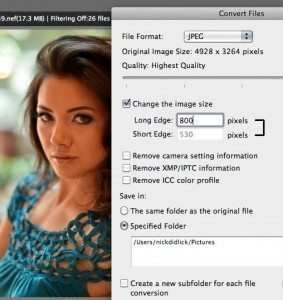
The Convert Files dialog box in Nikon View NX
Answer:
Comcast is right and a normal ISP (Internet Service Provider) attachment size is 2 megs and so you are lucky to have ComCast and the tec support people. Also some ISP’s will reject file sizes over 2 megs so for instance when sending to “[email protected]” your 10 megs attachment will bounce back at you.
Solutions:
- Published in PhotoBlog