
Which Tripod?
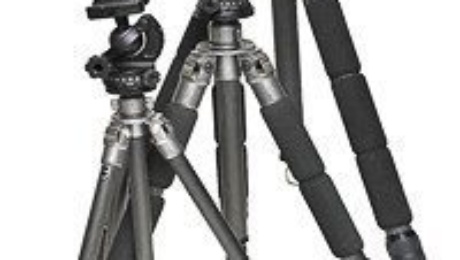
Tripods and Monopods
Over 30 odd years of being a photographer I have purchased many tripods amounting to $1000’s of dollars. What I learned is that I should have bought one good tripod and kept it for life.
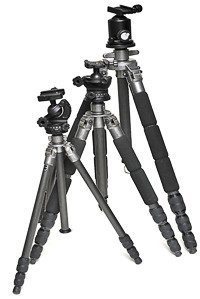
My Favourite Three
Whats a good tripod you may well ask? And the answer would be it depends! The best tripod is one that you carry with you and use. So that means it should be lightweight (so you will carry it) and expensive (so that you will use it) if you buy a cheap heavy tripod it will probably never leave home.
What features should you look for in a tripod? These can be broken down into two types. Still photo tripods and Video tripods lets look at Still photography tripods first. I look for a still photography tripod without all the bells and whistles which means no fancy locking mechanisms for the legs, and definitely a simple tripod head without and all sorts of handles. These handles and fancy leg locks will just get broken off or stop functioning over a few months or years of use.
Next consider the weight of camera/lens combination you will be using on your tripod. The heavier camera and lens combination you plan to use on your tripod means that you will need a heavier, beefier tripod and tripod head.
So where to start? I purchase a Tripod and Tripod Head separately and I have three weights of tripods I use. Which tripod I will take will depend on the nature of my trip and the cameras I will be placing on them, here is what I currently use with links to the manufacturers website.
Still Photography Tripods
Light Weight (Backpacking) – Gitzo G1057 Carbon 6X
Medium Weight (Air Travel) – Gitzo Mountaineer G1228 great to carry, pack in your suitcase for travel.
Heavy Weight (The Ultimate in Support) – Gitzo Mountaineer G1348 needs an optional center column.
Tripod Heads
Ball Heads are a favourite of mine because they are sturdy, strong and versatile little workhorses. Remember to get a camera plate to match your camera/lens combination to the ball head of your choice.
There are lots of choices out there but the companies I turn to are
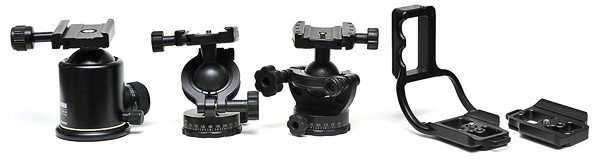
Tripod ball heads and camera mounting plates
Video Tripods
With most DSLR’s capable of shooting full HD video these days the need to have a “video tripod” will become rapidly evident if you plan to pan during a shot.
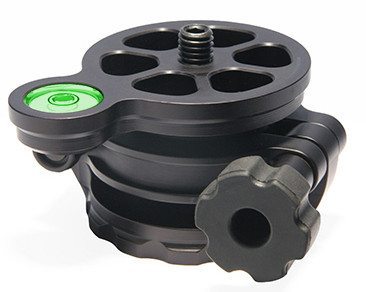
The Acratech Leveling Base
While you can use still photo tripod for “locked down shots” in video it’s not designed to do pans where a levelling base or bowl with and a fluid head is needed where not only the tripod can be levelled, but the head van be levelled as well. This will allow a true horizontal pan during a shot and the use of a fluid head will ensure that a smooth pan both horizontally or vertically is attained. You can use a video tripod for still photography as a video tripod can be locked into position but generally you will find that video tripods are bulkier and heavier than still camera tripods.
What do I use will again it depends on shoots I want to take only one tripod I will use one of my Gitzo tripods and take a Ball head? But I when I want to shoot video I will attach a Acratech leveling base and a Gitzo fluid head this is a real slick hybrid I place on my still camera tripod for travelling
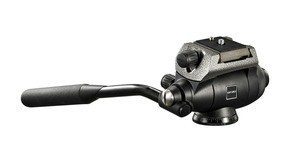
The Gitzo G2180 Fluid Head
Looking for a good inexpensive video tripod for lightweight DSLR Video shoots? check out this Pearstone entry level Video Tripod VT2500B
And if you need something more robust my current favourite is this
Manfrotto Pro Video Head 504HD
with the Manfrotto 545B Pro Heavy-Duty
The bottom line do a little thinking about the shooting you plan to do with your tripod. How heavy is the gear plan to use, is video an important factor. Are you staying near home or studio for shoots or flying, hiking for shoots.
Remember buy a good one that fits your needs and make sure you use your new purchase!
- Published in PhotoBlog
Using VR Lenses on a Tripod
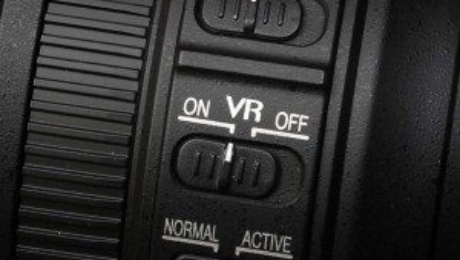
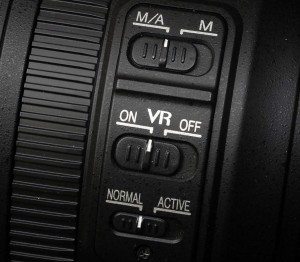
Vibration Reduction (VR) On or Off
Vibration Reduction (VR) is one of the standard questions that comes up in seminars I do. Can I use Nikon’s VR lenses on a Tripod? And the answer is… Maybe!
Here is what Nikon says:
There are two techniques when using a camera/lens mounted on a tripod; keeping the pan/tilt head loose or fluid (when panning or moving with a subject) and keeping the pan/tilt head locked down and rigid while using a cable release (time exposures or for the new HDR techniques).
With the following lenses/cameras VR should be “Off” when the camera is mounted on a tripod and the pan/tilt head is locked down and using a cable release:
- 105mm f/2.8G ED-IF AF-S VR Micro Nikkor
- 18-200mm f3.5-5.6 ED-IF AF-S VR DX Zoom-Nikkor
- 24-120mm f3.5-5.6G ED-IF AF-S VR Zoom-Nikkor
- 70-200mm f2.8G ED-IF AF-S VR Zoom-Nikkor
- 80-400mm f4.5-5.6D ED VR AF Zoom-Nikkor
- 70-300mm f4.5-5.6G IF-ED AF-S VR Zoom-Nikkor
- Coolpix 8800
With the following lenses/cameras VR should be “On” when the camera is mounted on a tripod and the pan/tilt head is loose (fluid) while using the cameras shutter release button:
- 105mm f/2.8G ED-IF AF-S VR Micro Nikkor
- 18-200mm f3.5-5.6 ED-IF AF-S VR DX Zoom-Nikkor
- 24-120mm f3.5-5.6G ED-IF AF-S VR Zoom-Nikkor
- 70-200mm f2.8G ED-IF AF-S VR Zoom-Nikkor
- 80-400mm f4.5-5.6D ED VR AF Zoom-Nikkor
- 70-300mm f4.5-5.6G IF-ED AF-S VR Zoom-Nikkor
- Coolpix 8800
Tripod Detection Mode
A feature of select NIKKOR VR (Vibration Reduction) lenses, Tripod Detection Mode automatically reduces vibration due to shutter release when the camera is mounted on a tripod.
It is often thought that using a tripod can fully prevent image blur caused by camera movement. But in fact, a tripod can minutely vibrate due to mirror and/or shutter movement at the time of exposure. This can result in slight blurring of the image. Nikon’s VR function automatically differentiates the frequency of this vibration from that of hand movement, and changes the algorithm to correct the image blur caused by this tripod movement. This feature is installed in some VR lenses, particularly super-telephoto lenses that are often used with a tripod. The following lenses employ an exclusive “Tripod mode” with which you can set this function at will.
- 200-400mm f4G ED-IF AF-S VR Zoom-Nikkor
- 200mm f2G ED-IF AF-S VR Nikkor
- 300mm f2.8G ED-IF AF-S VR Nikkor
- 400mm f/2.8G ED AF-S VR Nikkor
- 500mm f/4G ED AF-S VR Nikkor
- 600mm f/4G ED AF-S VR Nikkor
For all lenses VR should be “On” when the camera/lens is used on a monopod.
The Bottom Line
So what do I do? When using my VR lens on a tripod that is locked down into position. I will turn VR off and then if I remember that I am using a lens with Tripod Detection Mode I will turn it on. Anytime I am using a Tripod that is not locked down, or using a Monopod I will turn VR on.
- Published in PhotoBlog